
Search Engines Engineer is a self-educated and Do it your self DIYS area with the tips and real working areas around the Search Engines.
Thursday, May 28, 2020

Monday, May 4, 2020


Monday, January 23, 2017
Top 10 bestselling AMD & Intel CPUs (Processors) of 2016-2017
Top 10 bestselling AMD & Intel CPUs (Processors) of 2016-2017
It is thrilling to see how processors alone have covered so much distance in the past decade. The first dual core processor was released in 2007 and now, in less than 10 years, we have surpassed Core i7 cpu having 4.0GHz speed each.
We now live in an era of Intel’s ‘I’ series cpu. These processors were first released in 2008 with Intel ‘Nehalem’ architecture. Further, processors in the series include latest Intel Core i3, Core i5 and Core i7 and AMD processors. All these ranges have further been fragmented into generations having low and high end processors alike.

Tick Tock model consists of new technology and new micro-architecture. In every micro-architecture of Intel, tick represents advancement in technology i.e. faster processor, while tock means advancement in micro-architecture i.e. smaller size. The whole ‘I’ series was produced based on the tick-tock model. The model was disintegrated in 2016 and was replaced by ‘Process-architecture-optimization’ model.

Today, we are going to take a look at 10 of the best AMD & Intel processors sold in 2016. The list includes all types i.e. high, mid and low-end processors and desktop, laptop and server processors so readers of all budgets and machines can decide upon their next purchase. Intel’s rival AMD has also made quite significant progress and has become a favorite among gamers. Therefore, our bestselling CPU processor selection of 2016 will include a mix of all.




Core i3 2120 supports DDR3 and DDR4 RAM modules alike. As a low-end processor, it runs on 65 watts and has a transfer rate of 5.00 MT/s.

While talking about the improvement in processors, one should not refrain from mentioning the tick tock model by Intel that is the base of all innovations in processing chips. The company has always used some kind of model that has kept it on the brink of innovation.

While talking about the improvement in processors, one should not refrain from mentioning the tick tock model by Intel that is the base of all innovations in processing chips. The company has always used some kind of model that has kept it on the brink of innovation.

Today, we are going to take a look at 10 of the best AMD & Intel processors sold in 2016. The list includes all types i.e. high, mid and low-end processors and desktop, laptop and server processors so readers of all budgets and machines can decide upon their next purchase. Intel’s rival AMD has also made quite significant progress and has become a favorite among gamers. Therefore, our bestselling CPU processor selection of 2016 will include a mix of all.
10 Best Selling Processors in the world in 2016-2017
| Processors | Cores | Threads | Architecture | Frequency | Socket | Price | |
| 1 | Intel Core i7-6700K | 4 | 8 | Skylake-S | 4.00Ghz | LGA1151 | View Price |
| 2 | Intel Core i7-2600 | 4 | 8 | Sandybridge | 3.40Ghz | LGA1155 | View Price |
| 3 | Intel Core i7-3770S | 4 | 8 | Ivy Bridge | 3.10Ghz | LGA1155 | View Price |
| 4 | Intel Core i7-3770 | 4 | 8 | Ivy Bridge | 3.40Ghz | LGA1155 | View Price |
| 5 | Intel Core i5-4590T | 4 | 8 | Haswell | 2.00Ghz | LGA1150 | View Price |
| 6 | Intel Xeon E5-2670 | 8 | 16 | Sandybridge-EP | 2.60Ghz | LGA2011 | View Price |
| 7 | Intel Core i7-950 | 4 | 8 | Bloomfield | 3.06Ghz | LGA1366 | View Price |
| 8 | Intel Core i5-4690 | 4 | 8 | Haswell | 3.5Ghz | LGA1155 | View Price |
| 9 | AMD FX 8350 | 8 | 16 | – | 4Ghz | Socket AM3+ | View Price |
| 10 | Intel Core i3-2120 | 2 | 4 | Sandybridge | 3.3Ghz | LGA1155 | View Price |
1. Intel Core i7-6700K
The first processor in our list of 10 best AMD & Intel CPU processors for 2016-2017 is Intel Core i7-6700K. This top selling CPU is based on a 14nm lithography chip and is made up of four cores and eight threads, having a base frequency of 4.0GHz.
On overclocking, the processor can move up to a frequency of 4.2GHz. It also supports turbo-frequency.
This processor uses the integer ‘K’ that stands for the term ‘unlocked’. In its literal sense, the processor can be overclocked seamlessly.
On Futuremark, Intel Core i7-6700K has a price of $325 and 3D Mark Score of 10530. It ranks the highest on performance scale in this price range.
Furthermore, this processor can support max memory size of 64GB and has Intel HD Graphics 530 installed. It supports both hyper-threading and turbo-boost and is well-suited for motherboards supporting DDR3 and DDR4 memory modules.
2. Intel Core i7-2600
Intel Core i7-2600, codenamed Sandy Bridge, was first made available to the public in year 2011. The processor is a quad-core, and has a bottom speed of 3.4GHz that can be clocked to a high of 3.8GHz. It has an 8MB cache size and a maximum memory capacity of 32GB.
The processor has high potential for multi-tasking and has been tested rigorously for overclocking. It fares better than its competitors from Intel and AMD in the same price range. Available on LGA 1155 socket, the CPU can support both DDR3 and DDR4 RAM modules. A benefit of using this processor is its hyper-threading. This is a mid-range processor that will get most of your work done with ease.
3. Intel Core i7-3770S
Intel Core i7-3770S, codenamed Ivy Bridge, is a desktop processor that was first made available in 2012. The quad-core model comes under mid-level processors due to its price range and core capacity.
It has 4 cores and 8MB of cache having max memory capacity of 32GB. The Core i7 operates at 3.1GHz base frequency, but it can be overclocked to 3.9GHz. The ‘S’ in Core i7 3770S means Performance-optimized-lifestyle model.
The processor has a bandwidth of 25.6GBs and has support for two memory channels. It supports DDR3 memory modules and operates at 65watts.
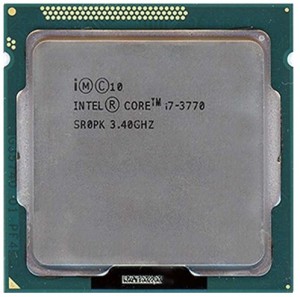
4. Intel Core i7-3770
Not all processors are built for speed, but Intel Core i7-3770 is one that is. Code-named Ivy Bridge, the processor was first made available in 2012. It is a quad-core model having 3.4GHz of speed. The processor supports four cores and eight threads and a max memory support of 32GB. Considered a faster desktop processor, Intel Core i7-3770 has a cache size of 8MB.
What we mean by faster is that it can run most of the games you install on it.
Though the CPU has 3.9GHz of speed, but users have reported it can be overclocked to 4.30GHz easily. The CPU is lithographed on a 22nm chip and runs on an average power of 77-watts.
Futuremark has rated it 4.5 on performance, meaning the processor can run anything you install in it, that too at max capacity!
5. Intel Core i5-4590T
Developed under Haswell line, the Intel Core i5-4590T is a desktop processor that was started marketing in 2014. The quad-core processor has high multi-tasking potential due to numerous cores and threads installed. The processor’s base frequency is 2GHz but overclockers can easily run it at 3GHz without its disintegration. Supporting 6MB cache and having support for 32GB memory, the quad-core processor works at 35watts of power on base frequency.
It has support for DDR3 and DDR4 memory sizes alike.
The CPU has shown maximum performance on multi-core use, beating all other Core i5 processors in the price range. However, on single-core use the processor’s performance decreases.
It supports LGA1150 socket compatibility.
6. Intel Xeon E5-2670
Intel Xeon E5-2670 is a server processor released in February 2012. The processor is codenamed Sandy Bridge-EP. It is an Octa-core model built for multi-tasking, speed and stability. The intel cpu processor is specific to servers engaged in complex tasks and require multi-threading.
The CPU supports 16 threads and is based on a 32nm lithography. By 16 threads, we mean it can run 16 processes at once. It has a base frequency of 2.6GHz but can be overclocked to 3.3 GHz, if need be. Usually, server processors are not overclocked because they are made to run efficiently on stock.
Due to increased threads, the processor powers up on 115watts. It supports both hyper threading and turbo boost technologies – much needed stuff in data centers.
E5 2670 has support for LGA 2011 socket, meaning both DDR3 and DDR4 memory sizes can be installed on it. The processor supports 32GB of RAM.
7. Intel Core i7-950
The Intel Core i7-950 is a mid-level processor having four cores and eight threads. The processor has a low maximum memory support in comparison with other Core i7 processors. However, it is considered better for multi-tasking due to its increased cores. Core i7 950 is a finer choice than rest due to its low price and high endurance capacity.
The processor normally operates at a clock speed of 3.06GHz but can be overclocked to 3.3GHz. The Intel Core i7-950 processor is lithographed on a 42nm chip.
Core-i7 950 processor supports three memory channels and has a memory bandwidth of 25GBs. The processor can run most of the games and software released in past years, as it runs well on single and multi-core use.
8. Intel Core i5-4690
Intel Core i5-4690, codenamed Haswell, is a desktop processor available from 2014. The quad-core model has enhanced potential for multi-tasking due to increased number of cores and threads. The processor has a 6MB cache size – considered above average core-i5 cache size – and supports 32GB of RAM.
Core i5 4690 has a clock speed higher than many other i5 processors in the market at 3.5GHz, which just increases its demand. It can be overclocked to 3.9GHz with a heat-sink. Geekbench has score it at 10,357, labelling it far better than other i5s in the same price bracket. The processor has support for two memory channels, DDR3 and DDR4 ram modules. That is why it is one of the Top 10 Intel Processors in the World.
9. AMD FX 8350
If you need intense performance, AMD FX 8350 is your best bet. This best amd processor has eight cores allowing you seamless performance on a budget. Having 4GHz of power, the AMD built can run most multi-tasking operations in seconds. And if that is not enough, this processor can be overclocked to 8.50GHz of speed – suitable for anything you demand from it. It has an average cache size of 8MB – an above average cache size in fastest AMD processors category, allowing you to carry out most tasks through your system alone.
The CPU can be paired with NVidia graphic cards for witnessing enhanced graphics and visualizations. In tests conducted, the processor maintained a playable frame-rate of 40. Though it’s a mid-level processor but it will run most of the games you want to play. The processor can also be used to run servers, but for heavy tasks such as dedicated serving, it will be sluggish due to its low bus capacity of only 4.2GHz. That is one reason it has made it to the list of Top 10 best AMD Processors in 2016/2017.
10. Intel Core i3-2120
Speaking of low-range processors, Intel Core i3-2120 is suitable for motherboards supporting core i3 models. The processor has two cores, four threads and a clock speed of 3.3 Ghz. Though, not built for multi-tasking, the processor can do well on games and visual software if a graphic card is installed.
The processor can support hyper-threading, but will catch heat a lot quicker. Therefore, proper ventilation would be required.
Bottom line:
Summing it all up, these are the top 10 processors in the world in 2016. You may have noticed we have missed some top-notch processors from the list especially 5960X and 4790K. The reason is, both of these are high-end processors and having higher price than the one we have already mentioned.

While talking about the improvement in processors, one should not refrain from mentioning the tick tock model by Intel that is the base of all innovations in processing chips. The company has always used some kind of model that has kept it on the brink of innovation.
source: http://blog.memory4less.com/top-10-bestselling-amd-intel-cpus-processors-of-2016/
Thursday, October 13, 2016
Google AdWords Editor now supports mobile-first innovations, Gmail ad templates, and more...
AdWords Editor now supports mobile-first innovations, Gmail ad templates, and more
Wednesday, October 05, 2016
The shift to mobile has happened. And as marketers on the frontline, you need tools that help you build mobile-first experiences at scale. AdWords Editor is here to help -- and just in time for the holidays. The latest version (11.6) includes support for universal app campaigns, Gmail ad templates, and much more.
Learn more about these updates in the AdWords Editor Help Center or download AdWords Editor here.
Universal app campaigns
Developers and marketers know it’s not just about driving app installs, it’s about delivering valuable actions within your apps. AdWords Editor now supports universal app campaigns (UAC), which help you find the customers that matter most to you, based on your defined business goals. With UAC, you can find valuable users for your app across Google Search, Play, YouTube, and within apps and mobile websites on the Display Network. Create and edit universal app campaigns in AdWords Editor today.Gmail ad templates
With Gmail ads, you can reach the 1B+ Gmail users around the world. Gmail ads provide a relevant way for you to connect with them as they're browsing promotional emails. AdWords Editor now supports Gmail image templates and Gmail single promotion templates so you can easily create, manage, and edit your Gmail ads, in bulk, alongside the rest of your ads.Expanded text ads
As a reminder, support for expanded text ads is also available in AdWords Editor. Expanded text ads provide more ad space so you can showcase additional details about your brand, products, and services. Check out our best practices guide for tips and tricks on writing compelling ads.Responsive ads
Responsive ads adapt to the increasingly diverse mix of content types and screen sizes across the Google Display Network. You can now create and edit responsive ads in AdWord Editor.And more…
The latest version of AdWords Editor also includes:- Device bid adjustments allow you to maintain the efficiency of managing a consolidated campaign that reaches consumers across devices, while giving you more control to set individual bid adjustments for each device type.
- Enhancements to advanced search, including an easier way to create filters.
- Scheduled downloads to help you stay on top of recent changes and performance statistics
Learn more about these updates in the AdWords Editor Help Center or download AdWords Editor here.
Wednesday, May 13, 2015
The Internet Era
The Internet Era
In 1985, Digital became the fifth company ever to register a .com domain name when they purchased dec.com. In 1993 they also registered digital.com, and became the world’s first computer vendor to open a public website on October 1 of that year.In December of 1995, Digital used the domain to launch one of the Internet’s first comprehensive search engines, AltaVista, at altavista.digital.com. (AltaVista was purchased by Yahoo in 2003 and shut down permanently in 2013.)
The photo above shows an early mainframe computer in action, thanks to this Flickr user.
Tuesday, October 28, 2014
Is HP lining up the sales of the shell of EDS? - Investigating Outsourcing
Is HP lining up the sales of the shell of EDS? - Investigating Outsourcing
Yes the HP splitting personal computers are fast especially for the everyday computing like a whole Presario and G series where the accessories upgrades some times hard to find from good retailers but I have seen and found HP parts store upgrades at www.memory4less.com/HP_Store.aspx
cheers,
Babr
Yes the HP splitting personal computers are fast especially for the everyday computing like a whole Presario and G series where the accessories upgrades some times hard to find from good retailers but I have seen and found HP parts store upgrades at www.memory4less.com/HP_Store.aspx
cheers,
Babr
Thursday, July 17, 2014
The Bing Product Ads are Down
The Bing Product Ads are now offline since 16 July 2014 till date and there are few products available for online listing, the system downtime mentioned at account as :Bing Ads will be down for maintenance between Sunday, July 20, 2014 8:00 AM and Sunday, July 20, 2014 2:00 PM. You will not be able to sign in, but your campaigns will continue to run."
Hopefully the Bing PLA will be Up as soon as possible as we all can see the best results if you compare the search results with Google PLA.
Hopefully the Bing PLA will be Up as soon as possible as we all can see the best results if you compare the search results with Google PLA.
Wednesday, June 25, 2014
Google Announces Update To Google Shopping Feed Specifications
Around September, they are launching a new and improved AdWords Policy Center
.

Friday, October 11, 2013
Search Companion Marketing: (SCM)
Search Companion Marketing:
- Search Companion Ads is the ideal Display “gateway” product for Search focused advertisers who haven’t yet tried advertising on Google Display Network. It will be a great way of introducing customers to GDN while at the same time not compromising on ROI when compared with their Search campaigns.
- Search companion marketing shows your ads to users who search with one of your keywords, but serves the add when a user lands on a page that's a part of the Google Display Network.
- Low traffic is common on this platform because SCM targeting relies on users to land on a site serving a GDN ad directly after a search is made. That said, this makes it a cost effective platform that's great for driving incremental conversions, since every click is highly relevant...
Since it is in beta, this is something Google Support team (a Specialist rep:) will launch for you, with your authorization....
Regards,
Raheel
Wednesday, October 2, 2013
Google Page Rank Updates - October 2013
Hello All,
After a long waiting of PR updates there
is still no changes in Google Tool bar PR yet! BUT there is a new / Enhance
page updates which is connected with the Google Advertising Channel (yes
AdWords) and indexing / ranking can be done under Advertising Channel
(especially a new campaign type is doing this job).
Google PRis ‘donated’ to other pages &
is shared by the number of outbound links on the pages. In theory, you may get
more Google PR benefits from a Google PR3 page with only two outbound links
than a Google Page Rank 5 page with hundreds of outbound links. As I have said
I’ve also experienced sites go from anywhere from PR 0 to PR 7 in one update
although in 2013 it’s hard to manipulate PR.
Last update was 4th of Feb 2013.
Thursday, February 21, 2013
Best Contextual Networks - 2013
*** Contextual Networks ***

- Google Adsense: http://accounts.google.com
- Valueclick: http://www.valueclick.com/
- Kontera: http://www.kontera.com/
- Pulse360: http://www.pulse360.com/
- Chikita: http://chitika.com/
- Clicksor: http://www.clicksor.com/
- Contextweb: http://www.contextweb.com
- Bidvertiser: http://www.bidvertiser.com/
- RevenuePilot: http://www.revenuepilot.com/
Raheel Aquil
Search Engines Ads Placement Expert
Internet Marketing & Advertising

Thursday, July 26, 2012
Product Listing Ads Appearing On Bing
Microsoft has been fast-following Google AdWords with new features in adCenter recently, so it’s not a huge surprise that some have spotted what look like Product Listing Ads (PLAs) in Bing Results.
“AdCenter is currently working on several ad product initiatives. Each initiative is at a different stage development and rollout stage,” a Microsoft spokesperson gave a statement. “The ad treatment referenced in RKG’s blog post is from a prototype experimentation that aims to collect initial engagement data on ads with detailed product information.”
While Microsoft wouldn’t give us creative specs for the unit, it appears to be a small, square image that accompanies the headline, landing page URL and text in the ad. As of yet, there’s no product name.


Thursday, July 5, 2012
Announcing AdWords campaign limits increase
Last year google Adwords support increased the limits for all advertisers to 500 campaigns and 3 million keywords per AdWords account in response to feedback from many of our advertisers, we are pleased to announce yet another AdWords campaign limit increase.
It is now possible to have 10,000 campaigns (includes active and paused campaigns) per account. With this change, it is now possible to easily manage and monitor more campaigns in a single place.
AdWords Editor, the AdWords API, and all other AdWords services are compatible with the new limits.
A full list of all account limits, including creative and ad extension limits, is available in the AdWords Help Center.
Wednesday, July 4, 2012
Why use CPA Bidding?
Anyone interested in achieving a ROI (return on investment) while using AdWords should at least look into testing CPA bidding once at some point. The opportunity to use an automated system which can consider a multitude of calculations every time a search relevant to your business is made, is a valuable one, especially when the system has the ability to make the best decision for your business. These calculations are based upon a variety of factors such as an ad’s conversion history, the keyword’s broad match query, the user’s location and the conversion rates of Google’s Search Network and partner sites on the Display Network. These factors can be taken into consideration manually to a certain extent but could never be performed as fast and often as the CPA bidding is able to. The manual approach would also mean downloading stat reports, analyzing keyword and ad performance, reviewing locations and time activity, etc; all this takes a considerable amount of time which is valuable within any business. The CPA bidding option addresses this issue and allows you to have a more automated approach to management.

When this feature was first released I decided to test it out on one of my client’s campaigns. The results were fairly instantaneous and resulted in a reduction in cost per conversion with an increased total number of conversions. Even now I will occasionally test CPA bidding with different client accounts to compare the performance against running the campaigns manually, generally the CPA bidding will match the performance at the very least but it is not unusual for it to perform even better.
Anyone interested in achieving a ROI (return on investment) while using AdWords should at least look into testing CPA bidding once at some point. The opportunity to use an automated system which can consider a multitude of calculations every time a search relevant to your business is made, is a valuable one, especially when the system has the ability to make the best decision for your business. These calculations are based upon a variety of factors such as an ad’s conversion history, the keyword’s broad match query, the user’s location and the conversion rates of Google’s Search Network and partner sites on the Display Network. These factors can be taken into consideration manually to a certain extent but could never be performed as fast and often as the CPA bidding is able to. The manual approach would also mean downloading stat reports, analyzing keyword and ad performance, reviewing locations and time activity, etc; all this takes a considerable amount of time which is valuable within any business. The CPA bidding option addresses this issue and allows you to have a more automated approach to management.

Monday, June 4, 2012
Ad rotation settingsLast month Google announced the Ads Rotation changing and how creative rotation works in AdWords. Specifically, when Google changed the even rotation setting to rotate evenly for a period of 30 days, after which AdWords would optimize to show your higher performing creatives more frequently. The concerns have focused on (1) the lack of an opt-out for this change and (2) the potential that the 30 day even rotation window might be shorter than your testing window for new ads. With the modified Rotate evenly setting, Google tests indicate that Google will provide you with more valuable traffic in an automated, efficient manner. They have found that, on average, optimized creative rotation results in an increase in click-through rate and an increase in total conversion volume for advertisers. Here’s an example describing the benefit (note: data is intended for illustrative purposes only):Advertisement A has a 3% CTR, while Advertisement B has a 1% CTR. Under the original Rotate evenly setting, the ads would show roughly evenly, resulting in an average CTR of around 2%. Under the new setting, Advertisement A will show more frequently after the even rotation window has passed, bringing the average CTR closer to 3%, or a 50% increase in clicks. The systems will also continue to run Advertisement B for a low fraction of traffic to continue to test how well it performs.Google also optimizing that if they see a large amount of demand for the opt-out over the next few weeks, they will also offer the opt-out in the AdWords interface directly.You can opt-out by filling in your information on this form or by contacting your account representative. Both of these changes will go into effect on June 11, 2012.
 The concerns have focused on (1) the lack of an opt-out for this change and (2) the potential that the 30 day even rotation window might be shorter than your testing window for new ads. With the modified Rotate evenly setting, Google tests indicate that Google will provide you with more valuable traffic in an automated, efficient manner. They have found that, on average, optimized creative rotation results in an increase in click-through rate and an increase in total conversion volume for advertisers. Here’s an example describing the benefit (note: data is intended for illustrative purposes only):Advertisement A has a 3% CTR, while Advertisement B has a 1% CTR. Under the original Rotate evenly setting, the ads would show roughly evenly, resulting in an average CTR of around 2%. Under the new setting, Advertisement A will show more frequently after the even rotation window has passed, bringing the average CTR closer to 3%, or a 50% increase in clicks. The systems will also continue to run Advertisement B for a low fraction of traffic to continue to test how well it performs.Google also optimizing that if they see a large amount of demand for the opt-out over the next few weeks, they will also offer the opt-out in the AdWords interface directly.You can opt-out by filling in your information on this form or by contacting your account representative. Both of these changes will go into effect on June 11, 2012.
Thursday, May 31, 2012
MSN Adcenter tips
Today I am going to share a few tips about Microsoft adCenter (formerly MSN adCenter). I believe that all the information written in this article is true, correct and complete.
I. Microsoft adCenter (formerly MSN adCenter) is Microsoft’s online advertising platform after forming an alliance with Yahoo! have an estimated audience of 164 million potential US customers. That’s 30% of US Search Market.
II. According to Microsoft website MSN/Live Search is converting users into buyers at a higher rate than Google or Yahoo and it’s correct too as from my own experience I have found that Microsoft adCenter offers a better conversion rates than Google AdWords. There were times when my conversions were over 25%.
III. The traffic quality of Bing is the best when compared to Google or AOL. It means you get more Return On your Investment (ROI).
IV. The whole Sign Up process is pretty easy with simple and powerful user interface. But I must say that Google AdWords’ interface is the best of all as it’s very simple and easy to use.
V. For customer support I give 5 star rating to Microsoft adCenter. And Google sucks when it comes to customer support. They were sending automated replies instead of responding to my emails.
VI. Pay less for quality traffic. It’s one of the biggest advantages of MSN adCenter over Google AdWords. adCenter’s bid rates are much lower than that of Google. The Minimum bid required per click is 0.05$. However the number of clicks are significantly lower than that of Google, it’s because of Google’s 60% market share in search market.
VII. Unlike Google AdWords there is no activation fee for Microsoft adCenter.
VIII. At this point of time Microsoft adCenter accepts only payments via Credit Card. Microsoft adCenter don’t accept PayPal but they do accept some Virtual Credit Cards and Gift Cards. I have recently tried to create an account using a Virtual Credit Card. The Sign Up process went smoothly but after a couple of hours I got an email message from adCenter team that they were unable to process my credit card. But I have used that same virtual card when I first used adCenter. Now they are not accepting the same I guess they improved their credit card verification process.
IX. I have read in some forum/blog that we can create up to 3 Microsoft adCenter accounts using the same credit card and earn coupon credits. Unfortunately it’s wrong you can’t Sign Up for multiple accounts to get the Promotional Credits. However it may work for you but it’s against Microsoft’s terms. Microsoft’s clearly says that “Promotional credit is valid only for new advertisers opening a new account with Microsoft adCenter”.
X. The Microsoft adCenter Promotional Credits is valid only to the residents of the US, Canada, UK, France & India.
BONUS Tip: Microsoft adCenter Promotion is different for each countries. adCenter Coupon for United States and Canada is $25, for UK it’s £30, for India it’s Rs. 500, and for France it’s €30. And so, your address and currency should match (e.g. UK address, UK currency; US address, US currency). You cannot change the currency once the account is created so make sure that the coupon is for the same currency and country you are located, otherwise it will not work properly since the adCenter promo codes are considered as type of currency.
I. Microsoft adCenter (formerly MSN adCenter) is Microsoft’s online advertising platform after forming an alliance with Yahoo! have an estimated audience of 164 million potential US customers. That’s 30% of US Search Market.
II. According to Microsoft website MSN/Live Search is converting users into buyers at a higher rate than Google or Yahoo and it’s correct too as from my own experience I have found that Microsoft adCenter offers a better conversion rates than Google AdWords. There were times when my conversions were over 25%.
III. The traffic quality of Bing is the best when compared to Google or AOL. It means you get more Return On your Investment (ROI).
IV. The whole Sign Up process is pretty easy with simple and powerful user interface. But I must say that Google AdWords’ interface is the best of all as it’s very simple and easy to use.
V. For customer support I give 5 star rating to Microsoft adCenter. And Google sucks when it comes to customer support. They were sending automated replies instead of responding to my emails.
VI. Pay less for quality traffic. It’s one of the biggest advantages of MSN adCenter over Google AdWords. adCenter’s bid rates are much lower than that of Google. The Minimum bid required per click is 0.05$. However the number of clicks are significantly lower than that of Google, it’s because of Google’s 60% market share in search market.
VII. Unlike Google AdWords there is no activation fee for Microsoft adCenter.
VIII. At this point of time Microsoft adCenter accepts only payments via Credit Card. Microsoft adCenter don’t accept PayPal but they do accept some Virtual Credit Cards and Gift Cards. I have recently tried to create an account using a Virtual Credit Card. The Sign Up process went smoothly but after a couple of hours I got an email message from adCenter team that they were unable to process my credit card. But I have used that same virtual card when I first used adCenter. Now they are not accepting the same I guess they improved their credit card verification process.
IX. I have read in some forum/blog that we can create up to 3 Microsoft adCenter accounts using the same credit card and earn coupon credits. Unfortunately it’s wrong you can’t Sign Up for multiple accounts to get the Promotional Credits. However it may work for you but it’s against Microsoft’s terms. Microsoft’s clearly says that “Promotional credit is valid only for new advertisers opening a new account with Microsoft adCenter”.
X. The Microsoft adCenter Promotional Credits is valid only to the residents of the US, Canada, UK, France & India.
BONUS Tip: Microsoft adCenter Promotion is different for each countries. adCenter Coupon for United States and Canada is $25, for UK it’s £30, for India it’s Rs. 500, and for France it’s €30. And so, your address and currency should match (e.g. UK address, UK currency; US address, US currency). You cannot change the currency once the account is created so make sure that the coupon is for the same currency and country you are located, otherwise it will not work properly since the adCenter promo codes are considered as type of currency.
Tuesday, December 14, 2010
Tuesday, September 14, 2010
Tuesday, May 18, 2010
Memory upgrades DDR DDR2 DDR3 Sdram Rambus SSD Flash Media and Storage at Memory4Less.com
Standard Memory Finder 100%Memory upgrades DDR DDR2 DDR3 Sdram Rambus SSD Flash Media and Storage at Memory4Less.com
Find Memory By Type:
Desktop Standard Memory
DDR3 SDRAM ($42-$656)
DDR2 SDRAM ($9-$1842)
DDR2 Fully Buffered ($56-$1675)
DDR1 SDRAM ($15-$399)
Rambus ($15-$399)
SDRAM Long Dimm ($13-$159)
168Pin EDO Dimm ($9-$112)
Find Memory By Type:
Desktop Standard Memory
DDR3 SDRAM ($42-$656)
DDR2 SDRAM ($9-$1842)
DDR2 Fully Buffered ($56-$1675)
DDR1 SDRAM ($15-$399)
Rambus ($15-$399)
SDRAM Long Dimm ($13-$159)
168Pin EDO Dimm ($9-$112)
Subscribe to:
Posts (Atom)